Web HostingBudget-friendly shared hosting plans
 Domains SearchFrom .com to unique country domains, explore and register extensions worldwide.
 WordPress HostingPower your blog or business with WordPress hosting.
 Email HostingSimple, secure email hosting that helps you stay connected and professional.
 Reseller HostingStart your own hosting business with easy and reliable reseller hosting plans.
 AffiliateJoin our affiliate program and earn commissions every time you bring in new customers.
 cPanel HostingHosting powered by cPanel, the world’s most user-friendly control panel.
 Windows HostingBuilt for Windows applications and websites
 IN Domain PricesDon’t miss out on the best domain deals in India!
 WHOIS LookupFind out who owns a domain name with a quick and easy WHOIS search.
 Domain TransferTransfer your domain to us and enjoy reliable support every step of the way.
 .Com DomainGet the most trusted domain for worldwide credibility
 All TldsSearch and register domain extensions worldwide.
 SSL CertificatesProtect your website with trusted SSL certificates and keep customer data safe.
 VPS HostingPowerful virtual servers. Full root access. Reliable uptime.
 Managed VPS HostingNot a tech expert? Choose our fully managed VPS service.
 Dedicated ServersTake full power and total control of your own physical server.
 AI Website BuilderCreate stunning websites instantly with our easy AI builder.
 Online ShopBuild your eCommerce store easily, no coding, just growth.
 Web Design ServicesGet a website built for your brand and designed for your goals.
 Contact UsReach out to us for support or questions.
 SupportGet answers and how-to guides for all our services.
 BlogRead our latest blogs on web hosting, online business, digital marketing, and other helpful topics.
Last updated on February 26th, 2026 at 05:17 am
Table of Contents
If you’re planning to launch a website, e-commerce store, or web application in India, you’ve probably come across the term VPS hosting.
It often appears as the “next step” after shared hosting, but what does it actually mean? And more importantly, do you really need it?
For many Indian users, hosting terminology can feel confusing. Providers sometimes use terms interchangeably, making it difficult to understand what you’re actually paying for.
This guide breaks VPS hosting down in simple, practical terms.
You’ll learn:
- What VPS hosting is
- How it works
- Its advantages and disadvantages
- What to look for when choosing a provider in 2026.
What Exactly is VPS Hosting?

VPS stands for Virtual Private Server. It is essentially a hosting environment created by dividing a single physical server into several independent virtual servers.
To understand this, imagine a large physical server in a data center in Mumbai.
Instead of allocating that entire server to a single customer (dedicated hosting) or having all the customers share the server resources (shared hosting), the provider partitions the server into several isolated virtual machines.
Therefore, although the VPSs share the same physical hardware, they are logically separated.
Each VPS runs its own operating system and has its own allocated CPU cores, RAM, and storage space.
In simple terms:
Shared hosting = sharing everything.
VPS hosting = sharing hardware, but not resources.
Dedicated hosting = owning the entire machine.
Main Types of VPS Hosting

Although there are many variations, VPS hosting generally falls into two primary types:
Managed VPS
With managed VPS, the hosting provider takes care of server-level management.
This includes:
- Installing the operating system
- Configuring the web server,
- Securing the server with firewalls
- Performing updates
- Handling backups, etc.
If you are a beginner, lack the expertise, or simply don’t want to manage the server infrastructure, managed VPS removes technical responsibility.
You focus on your website and business while the provider handles the rest.
The trade-off is cost.
Managed VPS is more expensive because you’re paying for technical support and system administration services.
Unmanaged VPS
Unmanaged VPS gives you full control over the server resources.
The provider typically installs the base operating system. After that, everything is your responsibility.
You must configure:
- Web server software
- Database services
- Security settings
- Firewall rules
- Backup systems
- Performance optimizations
This type of VPS hosting is cheaper than managed VPS hosting, but it demands real server knowledge.
Therefore, it’s ideal for developers or businesses with an in-house technical team.
Advantages of VPS Hosting
I) Dedicated resources, better performance
Unlike shared hosting, VPS offers dedicated CPU, RAM, and storage.
This ensures stable performance even during peak traffic.
It also improves page load speed, database queries, and application responsiveness.
II) Improved Security
Even if another VPS is compromised, your environment remains safe.
You can also configure firewalls, install custom security tools, and control access via SSH keys for extra security.
III) Scalability
Unlike most shared hosting plans, it’s easy to upgrade server specs (e.g., more RAM or CPU cores) as your traffic grows with VPS hosting.
In most cases, upgrades can be done without migrating to a new server.
IV) Customization
VPS hosting allows for more customization of your environment.
You can configure server settings, install custom applications, and adjust security measures according to your needs.
Disadvantages of VPS Hosting
I) Cost
VPS hosting is more expensive than shared hosting because you’re paying for dedicated resources.
II) Complexity
Even managed VPS requires a basic understanding of hosting concepts.
III) Overprovisioning risk
Some providers oversell VPS nodes. If not properly managed, this can reduce performance.
Do I Need VPS Hosting?

Not every website needs VPS hosting. In fact, many small websites function perfectly on shared hosting.
The key is recognizing the signs that your current hosting environment is becoming a limitation.
Here are some indicators that it may be time to upgrade:
a) Your website slows down during traffic spikes
On shared hosting, you compete for CPU and RAM with dozens, if not hundreds, of other websites.
If your site loads quickly most of the time but becomes noticeably slow during traffic bursts, VPS is often the logical next step.
b) You’re frequently hitting resource limits
Shared hosting providers often restrict CPU usage, RAM usage, concurrent connections, and database queries.
If you regularly see “Resource limit reached” or “503 Service Unavailable” errors, that’s a strong sign your website has outgrown shared hosting.
c) Your business depends on uptime
If your website directly generates revenue, as in e-commerce stores, then uptime and performance become business-critical.
VPS hosting provides better isolation and stability, reducing the risk of downtime caused by other accounts.
d) You need more control
If you want more control of your server configurations, VPS hosting provides the flexibility you need.
This is especially relevant for developers, SaaS startups, and agencies.
e) You’re planning for growth
Sometimes the decision isn’t about current problems, it’s about future plans.
If you expect:
- Aggressive marketing campaigns
- Paid traffic scaling
- Seasonal spikes (e.g., festive sales in India)
- Rapid content growth
Upgrading to a VPS before performance issues arise can prevent disruptions later.
What Should I Look for When Choosing a VPS Hosting Provider?

When choosing a VPS hosting provider, it’s easy to get distracted by flashy pricing.
However, a good VPS decision requires evaluating a few important areas.
You should assess:
1) Server Location and Network Infrastructure
Server location directly affects website speed. The closer your server is to your audience, the lower the latency.
For Indian users targeting customers in cities like Mumbai, Delhi, or Bengaluru, choosing a VPS provider with data centers in India significantly improves loading speed.
But location alone isn’t enough. Network quality also matters.
A good provider invests in high-speed backbone connections, redundant network routes, and more.
This ensures that even during traffic spikes, your website remains accessible.
2) Hardware Resources
The performance of your VPS largely depends on the quality and allocation of hardware resources, specifically virtual CPU cores (vCPUs), RAM, and storage type.
CPU
The number of virtual CPU cores determines how much processing power your server can handle.
CPU performance affects how quickly your server executes tasks, such as processing user requests, running scripts, handling database queries, and serving dynamic content.
If your website processes payments, user logins, or complex backend logic, prioritize sufficient CPU allocation.
RAM
RAM determines how many applications and user processes your server can manage at once.
If RAM is too low, you may encounter “503 Service Unavailable” errors during peak traffic.
Therefore, avoid choosing a VPS plan based solely on low cost if it sacrifices adequate memory.
Storage
Storage type affects how quickly data is read and written.
In 2026, NVMe SSD and SSD storage are the preferred standards because they are significantly faster than traditional HDDs.
Faster storage improves database response times, page loading speed, and application performance.
3) Virtualization Technology and Performance Isolation
Not all VPS hosting environments are equally isolated.
The virtualization technology used determines how independent your VPS truly is from other users on the same physical server.
Modern VPS providers typically use KVM virtualization, which offers full kernel-level isolation. This means your server environment behaves like a true independent machine.
Some older virtualization systems share a common kernel in multiple VPS instances. This can limit customization and, in rare cases, impact performance isolation.
4) Scalability and Upgrade Flexibility
Your hosting needs today may not reflect your needs six months from now.
A good VPS provider should allow you to upgrade CPU, RAM, and storage easily without complex migrations.
Some providers offer seamless upgrades with minimal downtime, while others may require server restarts or even manual migrations.
5) Management Level and Technical Support
One of the most important combined considerations is whether the VPS is managed or unmanaged.
With managed VPS, the hosting company significantly reduces your technical responsibility.
In unmanaged VPS, you are responsible for configuring and maintaining the server yourself.
However, no matter the choice, support quality matters.
A provider offering 24/7 technical support with knowledgeable staff can save hours of frustration during emergencies.
6) Security Infrastructure
A reliable VPS provider should include baseline protection. This includes:
- DDoS mitigation
- Network firewalls
- Secure isolation between virtual environments.
Beyond provider-level security, your VPS should allow you to implement custom security measures, such as SSH key authentication, intrusion detection systems, and malware scanning.
7) Backup System and Data Protection
Backups are your safety net against data loss.
Even with strong security, accidents like plugin conflicts, accidental deletions, or corrupted databases happen.
You should evaluate:
- How frequently backups are taken (daily, weekly)
- How long backups are retained
- Whether restoration is easy and free
8) Uptime Guarantee and Service Reliability
Uptime measures how consistently your server remains operational.
A 99.9% uptime guarantee allows roughly 8-9 hours of downtime per year. Higher guarantees, such as 99.95% or 99.97%, reduce annual downtime further.
For businesses generating revenue online, downtime translates directly into financial loss.
Therefore, look for providers that clearly state uptime guarantees and back them with service level agreements (SLAs).
Truehost: The Best VPS Hosting Provider in India

After understanding what VPS hosting is, its advantages, and when you actually need it, the next step is choosing a reliable provider.
Truehost consistently ranks among the top VPS providers in India, and for good reason.
Why Truehost stands out:
1) 24/7/365 Customer Support
One of the most common challenges with VPS hosting is technical issues.
Truehost provides round-the-clock local support via email, chat, WhatsApp, and phone.
This level of support is crucial for your business as it ensures that every transaction, order, or client interaction proceeds without interruption.
This ensures that both your reputation and income are protected.
2) Performance-Oriented Hardware
Truehost VPS uses KVM-powered virtualization and provides high-performance SSD storage with modern CPU architectures.
This ensures faster read/write speeds, improved database response times, and overall better server performance.
3) Local Currency Billing and Affordable Pricing
A major point for Indian users is foreign currency pricing and international payment complications.
Truehost addresses this by offering plans in INR, with multiple payment options including Paypal and credit/debit cards.
This simplifies budgeting and eliminates hidden currency conversion fees, making VPS hosting accessible to Indian small businesses, startups, and individuals.
4) Reliable Uptime
Website uptime is critical for any business.
Truehost guarantees uptime of 99.97%, meaning your website is always accessible to visitors.
Reliable uptime prevents negative user experience, lost sales from downtime, and reduced SEO rankings due to frequent outages.
5) Flexible Managed and Unmanaged Plans
Truehost offers both managed and unmanaged VPS options.
This allows you to choose a plan based on your technical expertise and budget.
Truehost Managed VPS:
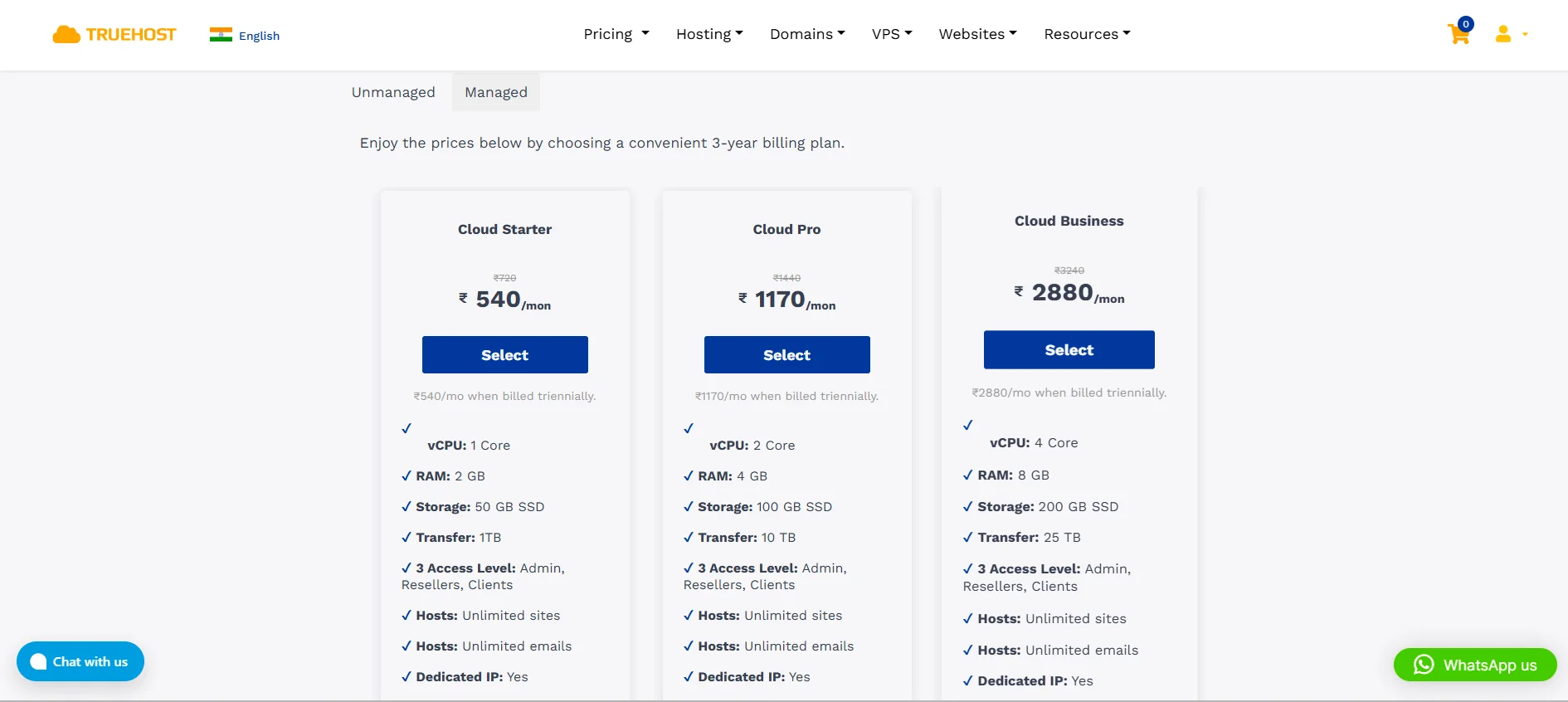
Here, Truehost will handle:
- OS and software updates
- 24/7 uptime and security monitoring
- Regular automated backups
- Performance optimization
Unmanaged VPS:
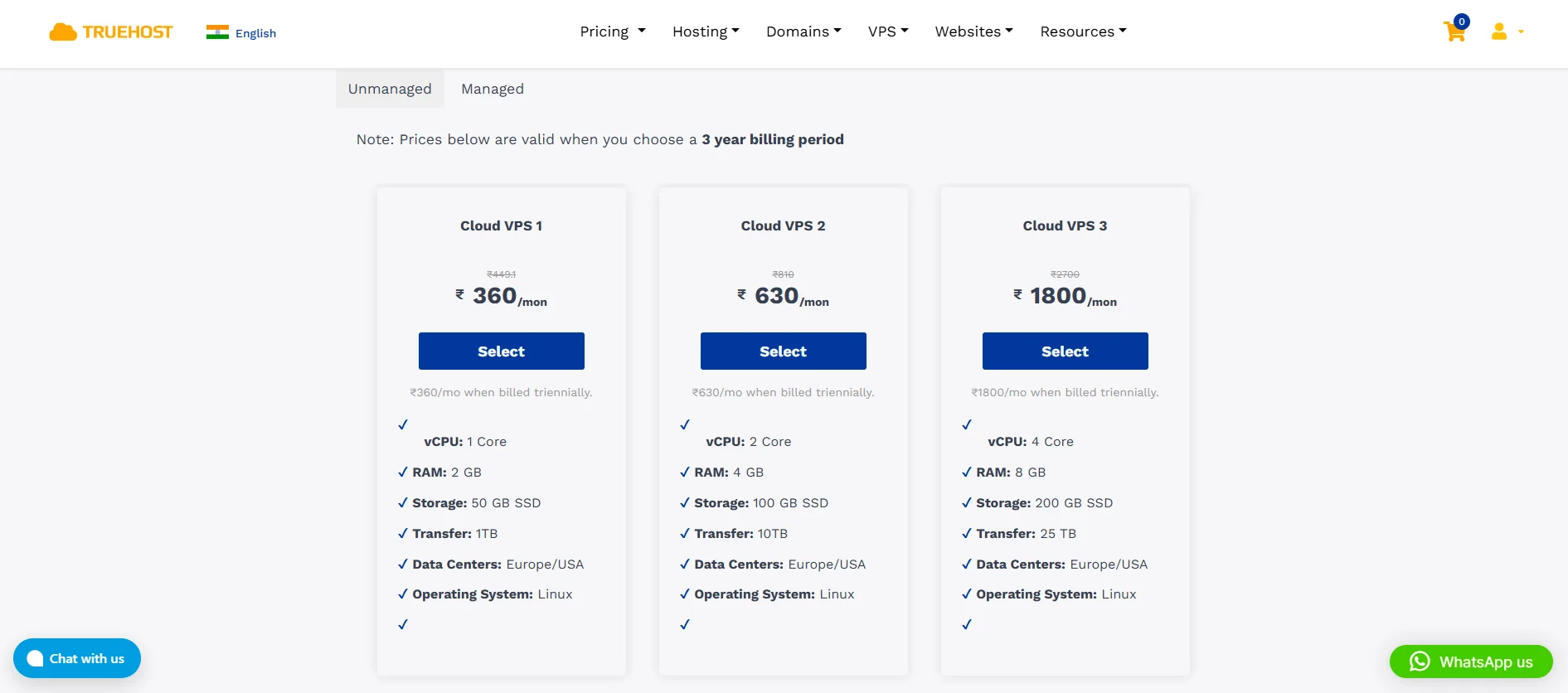
Here, Truehost lets you control every aspect of your server, making it ideal if you have the expertise and want complete flexibility.
We, however, still offer 24/7 customer support in case you run into any issues.
We also offer additional perks, such as free control panels and dedicated IP addresses.
6) Secure Data Centres and Low Latency
While Truehost operates data centers in Europe and the USA, their high-speed international network and optimized routing ensure Indian visitors still experience low latency.
Lower latency translates into faster loading times, a critical factor for improving user experience, SEO rankings, and conversion rates.
7) Strong Security and Backup Features
Truehost VPS comes with security features such as:
- Firewalls
- DDoS protection
- SSH key authentication
- Automated backups
This ensures your website and customer data are secure.
This is a vital consideration for e-commerce stores, SaaS platforms, and businesses handling sensitive user information.
8) Easy Scalability
Truehost VPS plans are designed to scale effortlessly as your business grows.
You can increase RAM, CPU, and storage with minimal downtime, allowing your website to handle sudden traffic spikes or long-term growth.
Conclusion
VPS hosting offers the perfect balance between performance, control, and scalability for websites that have outgrown shared hosting.
Choosing VPS hosting is an investment in your website’s speed, stability, and long-term growth.
By understanding your needs and selecting a reputable provider like Truehost, you can ensure your website is ready to perform at its best today and scale efficiently tomorrow.
To learn more about our VPS Hosting plans, click here.