 Web HostingBudget-friendly shared hosting plans
 Domains SearchFrom .com to unique country domains, explore and register extensions worldwide.
 WordPress HostingPower your blog or business with WordPress hosting.
 Email HostingSimple, secure email hosting that helps you stay connected and professional.
 Reseller HostingStart your own hosting business with easy and reliable reseller hosting plans.
 AffiliateJoin our affiliate program and earn commissions every time you bring in new customers.
 cPanel HostingHosting powered by cPanel, the world’s most user-friendly control panel.
 Windows HostingBuilt for Windows applications and websites
 IN Domain PricesDon’t miss out on the best domain deals in India!
 WHOIS LookupFind out who owns a domain name with a quick and easy WHOIS search.
 Domain TransferTransfer your domain to us and enjoy reliable support every step of the way.
 .Com DomainGet the most trusted domain for worldwide credibility
 All TldsSearch and register domain extensions worldwide.
 SSL CertificatesProtect your website with trusted SSL certificates and keep customer data safe.
 VPS HostingPowerful virtual servers. Full root access. Reliable uptime.
 Managed VPS HostingNot a tech expert? Choose our fully managed VPS service.
 Dedicated ServersTake full power and total control of your own physical server.
 AI Website BuilderCreate stunning websites instantly with our easy AI builder.
 Online ShopBuild your eCommerce store easily, no coding, just growth.
 Web Design ServicesGet a website built for your brand and designed for your goals.
 Contact UsReach out to us for support or questions.
 SupportGet answers and how-to guides for all our services.
 BlogRead our latest blogs on web hosting, online business, digital marketing, and other helpful topics.
Nearly every guide gives the same advice. Pick a host with a server in India, and you’re done.
That advice isn’t wrong. However, it covers only one choice out of many.
A Mumbai server won’t rescue you from a renewal bill far above your first invoice. It won’t fix a checkout page that rejects UPI. It also won’t help if support goes quiet during Indian business hours.
So this guide gives you eight criteria to check before you pay. Each one comes with a test you can run yourself. At the end, a scorecard turns your notes into one clear WordPress hosting pick.
1) Match Your Server Location to Where Your Visitors Live
Server location still counts. Still, the right spot depends on your visitor map, not a blanket rule.
Open Google Analytics 4 and check what share of your traffic comes from India. Then look at the city split. Your audience may sit mostly in Delhi, Mumbai, or Bengaluru. If so, host close to them.
Does an Indian Data Center Help Speed and SEO?
Distance adds delay. Time to first byte (TTFB) measures how long a server takes to start replying. A server in Mumbai reaches a visitor in Pune sooner than one in Singapore or Virginia.
Some numbers back this up, although they’re dated. When Google Cloud opened its Mumbai region, it said local hosting could cut latency by 20 to 90%.
The comparison was against Singapore, and it applied to users in Mumbai, Chennai, Hyderabad, and Bangalore. Kinsta quoted that claim when it added a Mumbai location. Treat it as a direction, not a promise.
One hosting vendor goes further. It claims offshore hosting adds 100 to 300 milliseconds or more to load times. That vendor sells Indian cloud servers, so measure the gap yourself.
What about SEO? We found no solid proof that an Indian server directly lifts rankings. Instead, the gain comes from quicker pages. Quicker pages keep visitors from leaving, which protects your sales and sign-ups.
Mumbai, Delhi, or Singapore: Pick by Visitor Map
Several providers now let you choose a location inside India. Confirm each list on the provider’s own page, since locations change.
Singapore still works for audiences spread across Southeast Asia. For a mostly Indian audience, however, a Mumbai or Delhi server usually wins.
Before you buy, test the location. Load a staging page from Indian networks and note the response time.
2) Read the Full Price: INR Rates, Renewals, and GST
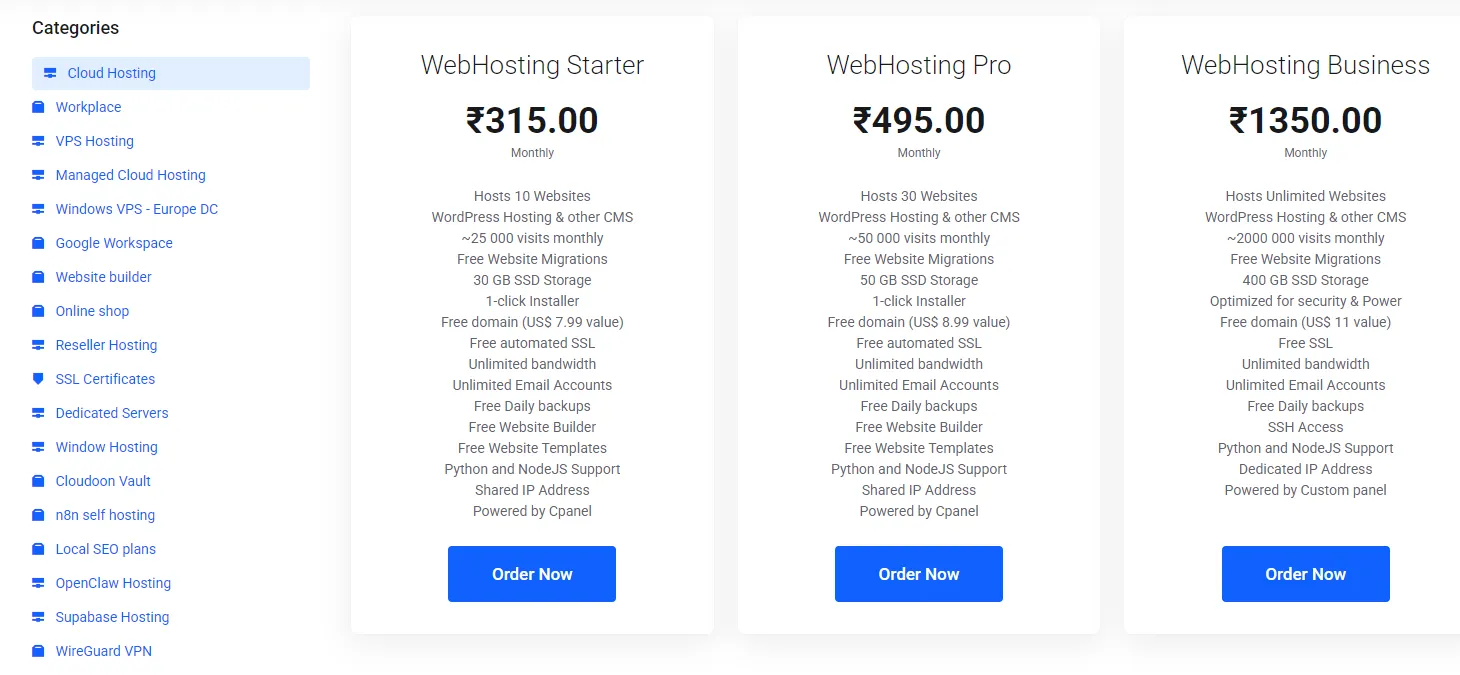
A hosting price has three parts. There’s the intro rate, the renewal rate, and the tax. Price all three before you compare plans.
Also, check whether the displayed price includes GST. Some Indian hosts show GST-inclusive prices. Others add the tax at checkout.
How Much Does WordPress Hosting Cost in India?
Cost climbs with each tier. Shared plans cost the least. Managed WordPress plans cost more, since the host handles updates, backups, and security. Cloud plans vary with the resources you pick.
INR billing can also save money. One recent comparison of VPS plans found Indian list prices 8-16% below converted dollar prices. WordPress plans may differ, so compare your own shortlist.
Write down the date you checked each price. Hosting prices change often, and a dated number keeps your comparison honest.
Compare the Renewal Price, Not the Intro Price
Intro offers pull you in. The renewal rate is what you pay for the years afterward. So compare plans on a three-year total.
Here is an example with made-up numbers. GST is excluded.
| Plan | Intro rate (year 1) | Renewal rate (years 2 and 3) | Three-year total |
|---|---|---|---|
| Host X | ₹150 per month | ₹450 per month | ₹12,600 |
| Host Y | ₹250 per month | ₹300 per month | ₹10,200 |
Host X looks cheaper on day one. However, Host Y costs ₹2,400 less over three years. These numbers are examples, not quotes.
Longer terms often lock in the intro rate for more months. Check how long the discount actually lasts.
Don’t count on a coupon later. Some hosts offer no public renewal codes at all.
One affiliate review of a large Indian host claims renewals run five to eight times the intro price. We couldn’t verify that figure, so read the renewal price at your own checkout page.
Check GST Invoicing and Input Tax Credit
Hosting in India carries 18% GST. Many hosts list it under SAC code 998315. Confirm the current rate on your invoice or with your accountant.
If you run a GST-registered business, you can claim input tax credit on that tax. You need a valid tax invoice that shows your GSTIN.
A compliant invoice usually shows these details:
- The host’s own GSTIN.
- A unique, sequential invoice number.
- A description of the service, such as the hosting plan.
- The tax split is either CGST and SGST or IGST.
- The total amount, tax included.
Enter your GSTIN at checkout. Fixing a missing GSTIN later means a support ticket. One host also advises keeping GST invoices for at least six years, so store them safely.
This guide isn’t tax or legal advice. Check the details with a qualified accountant.
3) Confirm the Payment Methods You Actually Use
Many Indian buyers pay with UPI, RuPay, or Netbanking. Your host should accept the method you use.
Support varies by provider. Hostinger India lists RuPay, UPI and GPay on its payment page. Domain India accepts UPI through Razorpay.
Some global hosts default to USD and card-only checkout. So test the checkout before you commit. Take the plan through to the payment step, then back out if your method is missing.
Check renewals too. At least one Indian host emails a renewal invoice 14 days ahead and expects manual payment. Unpaid invoices can lead to suspension.
4) Pick the Hosting Type That Fits Your Site

Hosting types differ in cost, control, and effort. Match the type to your site profile.
- Shared hosting: Lowest cost. Your site shares resources with others. It fits a new blog or a small brochure site.
- Managed WordPress hosting: The host handles updates, backups, and security. It fits business sites and owners short on technical time.
- Cloud hosting: You pick the resources. It fits online stores and sites with traffic spikes.
Watch for signs that you’ve outgrown shared hosting. Pages slow down during campaigns. The WordPress dashboard lags. Checkout pages time out.
5) Test Speed and Uptime from Indian Networks
Provider claims cost nothing to make. Your own tests cost little and tell you more. Run them before you pay in full.
- Pick a test location in India where the tool offers one. WebPageTest and GTmetrix both list test locations.
- Read TTFB, Largest Contentful Paint (LCP), and uptime history. Google treats an LCP of 2.5 seconds or less as good.
- Run the test at different times of day. Evening traffic can show weak spots that a morning test hides.
- Add a free uptime monitor, such as UptimeRobot, during the refund window.
Treat uptime promises as claims. Read the SLA to see what the host owes you if it misses them. Then use the refund window as a real trial.
6) Judge Support by Hours, Channels, and WordPress Skill
Support is where cheap plans often cut corners. Test it before you need it.
- Hours: Check whether support runs in Indian time zones. Local support in your time zone saves you hours of waiting.
- Channels: Compare live chat, phone, and tickets. Check language options if your team prefers Hindi or another Indian language.
- WordPress skill: Ask a WordPress-specific question before you buy. For example, ask how the team handles a plugin conflict after an update. Time the reply and judge the answer.
- Migration help: Ask whether the team moves your site for free, and what the limits are.
7) Check Security, Backups, and Data Residency Rules
Start with the baseline. Look for free SSL, a firewall, malware scanning, and daily backups. Then restore a backup on a staging copy. A backup you haven’t tested is only a hope.
Next, sort out data residency. Many site owners assume Indian law forces data onto Indian servers. One recent analysis reads India’s DPDP Act differently.
It says personal data can be hosted outside India. The government can still restrict transfers to certain countries, so check current notifications.
Payment data follows a stricter rule. An April 2018 RBI circular requires payment system operators to store full payment data only on servers in India. If your site handles card or UPI data directly, offshore storage can break that rule.
Most shop owners pass payments to a licensed gateway. Ask your gateway and a lawyer where the duty sits. Verify both rules against RBI and MeitY sources before you decide.
8) Check Room to Grow, Migration, and Exit Terms
Your first plan won’t fit forever. Plan the exit before you enter.
- Upgrades: Check whether a plan upgrade needs downtime or a migration.
- Migration: Many hosts offer free migration. Read the limits, such as the number of sites or a time cap.
- Refunds: Many hosts offer a 30-day refund window. Read whether domains and add-ons are excluded.
- Exit: Ask how you can export your site and backups if you leave.
9) Score Your Shortlist with a Simple Weighted Checklist
Notes pile up quickly. A scorecard keeps them honest. Rate each host from 1 to 5 on six criteria. Multiply each score by its weight, then add the results.
Weights differ by site type. A content blog values price and speed. A store values security and payments more.
| Criterion | Blog weight | Store weight |
|---|---|---|
| Location and speed | 25 | 25 |
| Three-year price | 25 | 15 |
| GST and payment methods | 10 | 15 |
| Support | 15 | 15 |
| Security and backups | 15 | 20 |
| Room to grow and exit terms | 10 | 10 |
| Total | 100 | 100 |
Here is a worked example for a blog. The hosts are anonymous.
| Criterion (blog weight) | Host A | Host B | Host C |
|---|---|---|---|
| Location and speed (25) | 5 | 4 | 3 |
| Three-year price (25) | 3 | 5 | 4 |
| GST and payment methods (10) | 4 | 3 | 5 |
| Support (15) | 4 | 3 | 5 |
| Security and backups (15) | 4 | 3 | 4 |
| Room to grow and exit terms (10) | 3 | 4 | 5 |
| Weighted total (max 500) | 390 | 385 | 410 |
Host C leads by 20 points. Hosts A and B sit within five points of each other. When scores run this close, let the refund-window test break the tie.
Copy the table into a spreadsheet and score your own shortlist.
FAQs
Which Hosting Is Best for WordPress in India?
No single host wins for everyone. The best pick depends on your traffic, budget, and tax needs. Blogs usually favor price and speed. Stores usually favor security and payment options. Run the scorecard above to see which host fits you.
Is Managed WordPress Hosting Worth It in India?
Yes, when your time costs more than the price gap. Managed plans handle updates, backups, and security for you. You can skip it if your site is small and you’re comfortable maintaining WordPress yourself.
Do I Still Need a CDN If My Host Has Indian Servers?
Often, yes. A CDN caches your pages closer to visitors and filters some attack traffic. It helps most when visitors also arrive from outside India. Some hosts include a CDN, while others charge extra. Check before you buy.
Shortlist Three Hosts and Test Before You Commit
Choosing a host in India comes down to five checks. Where does the server sit? What will you pay by year three? Does checkout accept UPI and issue a GST invoice? Does support answer during your hours? Can you test the host and leave if it fails?
Shortlist three hosts today. Fill in the scorecard, then use each refund window to run a speed test from an Indian network. Keep the winner and cancel the rest before the window closes.