Web HostingBudget-friendly shared hosting plans
 Domains SearchFrom .com to unique country domains, explore and register extensions worldwide.
 WordPress HostingPower your blog or business with WordPress hosting.
 Email HostingSimple, secure email hosting that helps you stay connected and professional.
 Reseller HostingStart your own hosting business with easy and reliable reseller hosting plans.
 AffiliateJoin our affiliate program and earn commissions every time you bring in new customers.
 cPanel HostingHosting powered by cPanel, the world’s most user-friendly control panel.
 Windows HostingBuilt for Windows applications and websites
 IN Domain PricesDon’t miss out on the best domain deals in India!
 WHOIS LookupFind out who owns a domain name with a quick and easy WHOIS search.
 Domain TransferTransfer your domain to us and enjoy reliable support every step of the way.
 .Com DomainGet the most trusted domain for worldwide credibility
 All TldsSearch and register domain extensions worldwide.
 SSL CertificatesProtect your website with trusted SSL certificates and keep customer data safe.
 VPS HostingPowerful virtual servers. Full root access. Reliable uptime.
 Managed VPS HostingNot a tech expert? Choose our fully managed VPS service.
 Dedicated ServersTake full power and total control of your own physical server.
 AI Website BuilderCreate stunning websites instantly with our easy AI builder.
 Online ShopBuild your eCommerce store easily, no coding, just growth.
 Web Design ServicesGet a website built for your brand and designed for your goals.
 Contact UsReach out to us for support or questions.
 SupportGet answers and how-to guides for all our services.
 BlogRead our latest blogs on web hosting, online business, digital marketing, and other helpful topics.
A visitor clicks on your website. They wait. And wait. But they eventually leave because your site took forever to load.
If you run a website, this scenario should keep you up at night.
Often, slow websites aren’t caused by bad design or low-quality hosting alone.
The real problem could be how your content is delivered to users.
If someone in Mumbai is trying to access your website hosted in the US, the content has to travel a long distance, which increases loading times.
A Content Delivery Network (CDN) solves this problem.
In this article, we’ll go over what exactly a CDN is and how it works to reduce latency.
What Is a CDN?
A Content Delivery Network (CDN) is a network of servers distributed across multiple geographic locations.
These servers store copies of your website’s content.
When a visitor opens your website, they receive content from the server nearest to them, not from your original hosting server.
Benefits of CDNs
1) Improves Website Load Times – CDNs deliver content from servers closest to your users, which reduces the distance data has to travel.
This means pages, images, and scripts execute without delay. Faster load times improve user experience and keep visitors engaged.
2) Reliability and Redundancy – A CDN spreads your website content across multiple servers.
If one server fails or experiences high traffic, another server automatically takes over.
This redundancy ensures that your website remains available even during technical issues or traffic spikes.
3) Increased Capacity – By distributing content across multiple servers, CDNs help your website handle sudden increases in traffic without crashing.
This is especially useful during promotional campaigns, product launches, or festive sales when many users access your site simultaneously.
4) Reduced Bandwidth Costs – Because CDNs serve cached content from edge servers, your origin server handles fewer requests.
This lowers the amount of data your server needs to send, which can significantly reduce bandwidth usage and associated costs.
5) Higher SEO Rankings – Website speed is a key factor in search engine rankings.
Faster-loading websites provide a better user experience, which search engines reward.
By improving page load times and reducing latency, CDNs indirectly boost your website’s SEO performance.
6) Improved Protection Against DDoS Attacks – CDNs can act as a shield against Distributed Denial-of-Service (DDoS) attacks.
By dispersing traffic across multiple servers and filtering out malicious requests, they help protect your website from being overwhelmed and taken offline.
Content Delivered by CDNs
A Content Delivery Network handles two broad categories of content: static content and dynamic content.
Understanding the difference between these two is important because each type is delivered and optimized differently.
Static Content
Static content refers to files that remain the same for every user and do not change frequently.
These include elements like images, logos, stylesheets, fonts, and basic HTML files.
Since this type of content does not depend on user interaction or personalization, it does not need to be generated repeatedly.
As such, it is ideal for caching.
A CDN stores copies of these files across multiple edge servers so that when users request them, they can be delivered instantly from the nearest location.
Dynamic Content
Dynamic content is different because it changes based on the user or the context of the request.
Examples include:
- Social media feeds
- Account dashboards
- Weather updates
- Login sessions
- Chat messages
Since dynamic content can’t be cached in the same way as static files, CDNs use specialized techniques to deliver it efficiently.
Instead of storing full copies, they focus on optimizing how requests travel between the user and the origin server.
This ensures that even personalized or frequently changing data is delivered quickly and securely.
How Does a CDN Work?
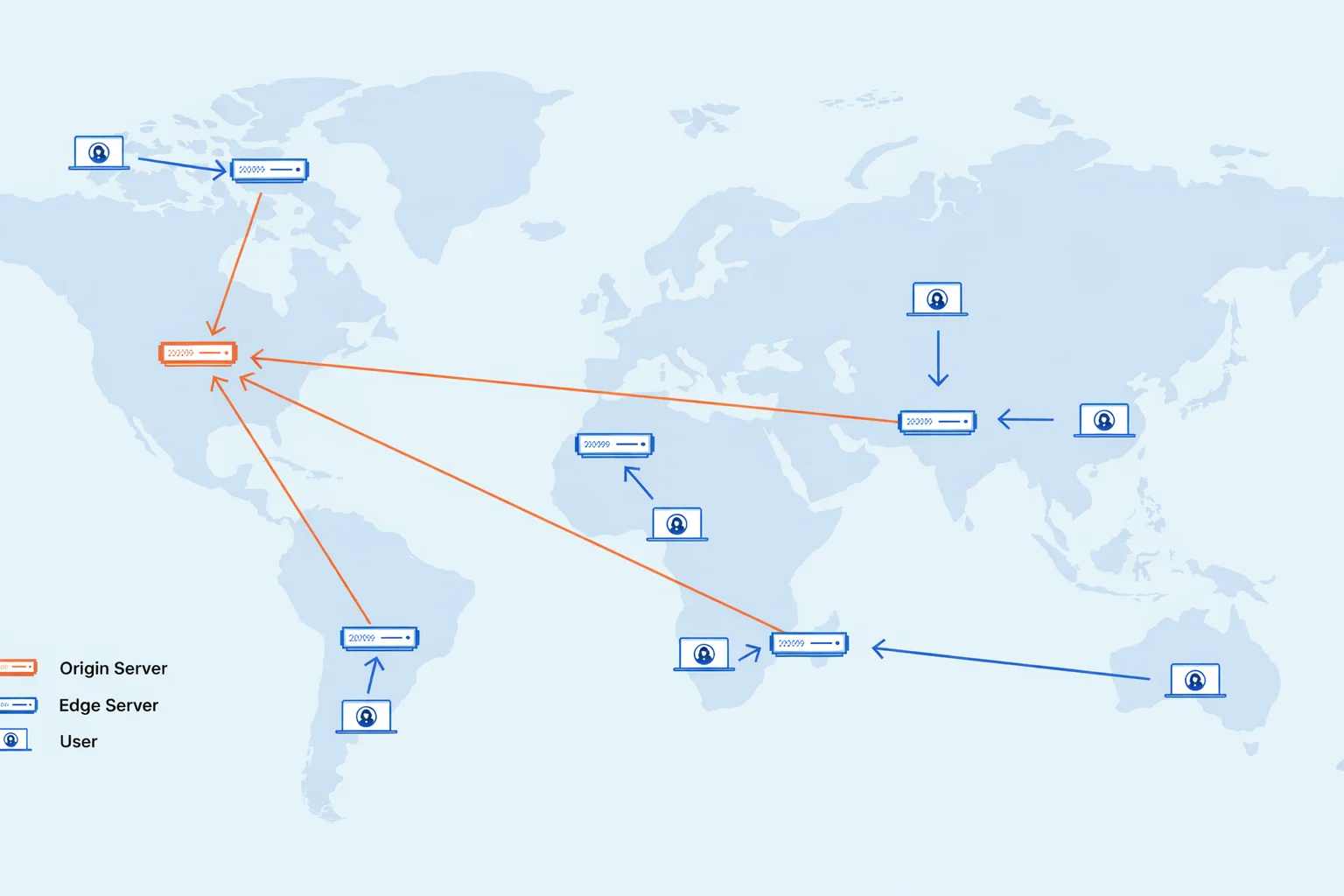
A CDN operates by placing edge servers in multiple geographic locations.
Edge servers are servers that process, store, or cache data close to users.
These servers form a distributed network that works together to deliver content efficiently.
The system relies on three key concepts: caching, dynamic acceleration, and edge-level processing.
Caching
Caching involves storing copies of website content so it can be delivered faster in future requests. In the context of CDNs, this mainly applies to static content.
Here’s how it works:
When a user located far from your origin server requests a file, the request first reaches your main server.
The server responds to the user and simultaneously sends a copy of that content to the nearest CDN edge server.
The edge server then stores the content.
When another user from the same region requests the same file, the CDN delivers it directly from the cached copy instead of contacting the origin server again.
This reduces response time and minimizes repeated processing on the main server.
Dynamic Acceleration
Dynamic acceleration focuses on improving the delivery of content that cannot be fully cached.
Dynamic requests must interact with the origin server.
If a user connects directly to a distant server, the request may face delays due to network congestion, long routing paths, or repeated connection setups.
When a CDN is involved, the request first reaches a nearby edge server.
That server already maintains optimized and trusted connections with the origin server, allowing data to travel faster.
Intelligent routing ensures that requests follow the fastest available path.
Proximity between CDN servers and origin servers reduces travel time.
Additionally, the CDN can compress or refine requests before forwarding them, which improves overall efficiency.
Edge Logic Computations
Modern CDNs can perform certain processing tasks at the edge server level.
This means that some logic is handled closer to the user instead of relying entirely on the origin server.
For example:
- Edge servers can inspect incoming requests and adjust caching rules accordingly.
- They can detect and reject invalid or suspicious requests before they reach the main server.
- As mentioned earlier, they also modify or optimize content, such as compressing images or adjusting headers, before sending it to the user.
By shifting some processing responsibilities, CDNs reduce the workload on the origin server and improve response times.
This distributed approach results in a faster and more scalable system overall.
What Is a CDN Used For?
Let’s look at the actual use cases for CDNs:
High-Speed Content Delivery
The primary use of a CDN is to deliver website content quickly to users across different regions.
By combining the delivery of both static and dynamic content, CDNs ensure that users receive a consistently fast experience regardless of their location.
Example:
A global news platform must deliver updates instantly to readers around the world.
By using a CDN alongside cloud storage, it can distribute content efficiently without relying on slower or more expensive traditional infrastructure.
Real-Time Streaming
Streaming platforms rely on CDNs to deliver large media files without interruptions.
Without a CDN, users may experience buffering or delays, especially during peak traffic.
With a CDN, media content is distributed across multiple servers, allowing users to access it from nearby locations.
This reduces latency, improves playback quality, and ensures a seamless viewing or listening experience.
Multi-User Scaling
Another important use of CDNs is handling large volumes of users at the same time.
A single server can only support a limited number of connections before performance starts to degrade.
CDNs solve this problem by distributing traffic across multiple servers.
This allows websites and applications to scale efficiently, even during periods of extremely high demand.
For instance, online gaming platforms and large applications with millions of users, like social media platforms, rely on CDNs to maintain performance.
By offloading a significant portion of the traffic, CDNs ensure that users can interact with the platform without delays or disruptions, even during peak usage.
When You Need a CDN (and When You Don’t)
CDNs are powerful, but they are not universally necessary.
Here’s how to decide whether one makes sense for your situation.
You Should Use a CDN If:
- Your audience is spread across India or internationally – e-commerce stores, news websites, SaaS platforms, and educational portals all fall into this category
- Your website is media-heavy, with lots of images, videos, or downloadable files like brochures or course materials
- You regularly run promotions or expect sudden traffic spikes
- Your Google Core Web Vitals scores are poor, particularly Largest Contentful Paint (LCP) and First Input Delay (FID)
- You want better SEO performance, since page speed is a confirmed Google ranking factor
- You need security benefits like DDoS mitigation, bot filtering, and Web Application Firewall (WAF) protection
You Might Not Need a CDN If:
- Your website serves a purely local audience – like a neighbourhood restaurant or a city-specific service provider
- Your site is mostly text-based with very few large dynamic assets
- Your traffic is consistently low, and your existing hosting handles it without strain
- Your origin server is already in India and geographically close to your primary audience
That said, CDNs have become increasingly affordable.
Cloudflare, for instance, offers a useful free tier.
The barrier to entry is low enough that the question is often not “do I need a CDN?” but rather “is there any reason not to use one?”
Choosing the Right Hosting for CDN Performance
A CDN works best when combined with a reliable hosting setup.
Your hosting server is the origin, while the CDN improves how content is delivered to users.
This means that if your origin server is slow or unreliable, it will affect how quickly and efficiently content is delivered through CDNs.
What to Look for in a Hosting Provider
You need a provider that complements the way CDNs operate to enhance overall delivery.
Look for:
1) High Performance
Your hosting server should respond quickly to requests, especially for dynamic content that can’t be cached.
A fast server ensures that when the CDN fetches data, it can deliver it to users without delay.
At Truehost, we offer hosting environments optimized for speed, ensuring your origin server doesn’t become a bottleneck when paired with a CDN.
b) Reliable Uptime
Consistent uptime is critical because your CDN depends on your origin server being available.
If your server goes down, the CDN cannot retrieve fresh content.
Truehost assures a 99.97% uptime, allowing your CDN to function without interruptions.
c) Scalability
As your website grows, your hosting must be able to handle increased traffic and resource demands.
A scalable hosting solution ensures that your origin server can support both direct and CDN-driven traffic efficiently.
Truehost provides scalable hosting plans that let you to easily upgrade resources as your website grows.
d) Global Infrastructure Compatibility
Since CDNs operate across multiple geographic locations, your hosting provider should integrate well with global delivery systems.
This ensures faster communication between CDN servers and your origin server.
Truehost has data centers across the world, enabling efficient content delivery across different regions.
e) Security Features
While CDNs provide an additional layer of protection, your hosting still needs to handle direct attacks and vulnerabilities.
The hosting provider you choose should offer strong security measures to protect your origin server from threats
Truehost includes essential security features (like SSL certificates) that help safeguard your website, complementing the protection offered by a CDN.
We also offer additional security tools to ensure that your websites are fully protected.
f) Ease of Integration
Setting up a CDN should be straightforward.
Your hosting provider should support easy integration through DNS settings, control panels, or platform-specific tools.
Truehost offers cPanel and custom panels depending on the hosting plan, making it easy for you to connect your website to a CDN.
Conclusion
A well-integrated CDN and hosting setup is what truly delivers performance.
The CDN handles speed and distribution, while your hosting ensures reliability and data availability.
If you’re serious about improving your website’s performance, choose a hosting solution that supports your growth, integrate a CDN, and give your users the experience they need.